Reference Finder:
Find the Citations Your Paper Is Missing
CSPaper
A part of Scholar7 AB · November 2026

Between 1987 and 2002, researchers ran 64 clinical trials of the drug aprotinin. The answer was clear by 1992, but the trials kept coming, and the later ones cited only about one in five of the trials before them [3]. Your missing citations probably won't cost dozens of clinical trials. They cost you in smaller ways: a reviewer who knows the paper you missed, a novelty claim that falls apart, a revision you didn't need.
Reference Finder reads your paper after its CSPaper Agentic Review, finds the claims that need a citation, and searches nine scholarly sources at once (OpenAlex, Semantic Scholar, Crossref, arXiv, DBLP, Europe PMC, CORE, Lens and Exa) for real papers that support each one. Every recommendation is an indexed paper with a link, scored for how well it backs the claim, and one click away from your BibTeX file. Reference Check asks if your citations are real. Reference Finder asks what you should be citing.
Why a missing citation is costly
The trapezoid that was cited hundreds of times
In 1994, the journal Diabetes Care published a new method for measuring the area under a glucose curve: split the curve into small trapezoids and add up their areas [1]. Within months, readers wrote in to point out that this is the trapezoidal rule, which calculus students learn in their first year. One letter was simply titled “Tai's Formula Is the Trapezoidal Rule” [2]. The paper has since been cited roughly 400 to 500 times, depending on the database. Calculus teachers everywhere felt very good about themselves that year.
It's a funny story. Most missing citations aren't.
When nobody reads the trials before theirs
Aprotinin is a drug given during heart surgery to reduce bleeding. Fergusson and colleagues found 64 randomized trials of it, run between 1987 and 2002 [3]. When they added up the results trial by trial, the answer was clear by the 12th trial, published in June 1992: the drug cut the need for blood transfusions. Dozens more trials followed anyway. The later reports cited only about 20% of the trials before them, and just 7 of 44 cited the biggest one, with 1,784 patients. In the authors' words:
Researchers “were not adequately citing previous research, resulting in a large number of RCTs being conducted to address efficacy questions that prior trials had already definitively answered.” [3]
It had happened before. By 1973, eight trials with 2,432 patients had shown that streptokinase, a clot-busting drug, saves lives after a heart attack. Twenty-five more trials then enrolled another 34,542 patients up to 1988, and mostly made the error bars a little thinner [4]. A second study by the same group found that expert review articles “often failed to mention important advances”, and asked for “better databases” to keep experts up to date [5].
And it's not just two drugs. Robinson and Goodman looked at 1,523 trials and found that the typical report cited only 21% of the earlier trials on the same question. When five or more earlier trials existed, almost a quarter of reports cited none of them. The typical report cited two, however many earlier trials there were [6].
It happens to the best of us
The 1986 Nature paper that popularized backpropagation is one of the most cited papers in machine learning [7]. The math at its heart had been published years earlier, including by Seppo Linnainmaa in 1976 [8]. Asked about this in 2020, Geoffrey Hinton was refreshingly honest:
“It is true that when we first published we did not know the history so there were previous inventors that we failed to cite.” [9]
GANs have a similar story. The first GAN preprint did not mention Jürgen Schmidhuber's earlier work on predictability minimization. The NeurIPS 2014 version added a paragraph calling it the “most relevant work” [10], and the argument over credit is still going [11]. You don't have to pick a side to see the lesson: a missing citation can follow a paper around for decades.
Reviewers are asked to look for it
Today, reviewers are told to look for missing prior work. The NeurIPS reviewer guidelines ask whether it is clear “how this work differs from previous contributions, with relevant citations provided” [12]. The ACL Rolling Review guidelines treat missing references to highly relevant published work as a problem [13]. A study of ICLR 2024 and 2025 reviews found that novelty was one of the two things that best predicted a paper's score, and “overlap with prior work” was one of the most common novelty complaints [14].
Finding that work is the hard part. A paper makes dozens of claims, and checking each one by hand is the first job to go when the deadline is two days away and the plots still look wrong.
The other half of the citation problem
Made-up citations were in the news a lot this year. GPTZero reported at least 100 hallucinated citations in accepted NeurIPS 2025 papers [15], and ICLR 2026 desk-rejected every paper with confirmed hallucinated references [16]. That is the problem Reference Check solves: a citation that's there but shouldn't be. Reference Finder solves the opposite one: the citation that should be there and isn't.
Reference Finder vs. Reference Check
CSPaper already has Reference Check. The two tools look at your citations from opposite ends, and most papers need both.
| Reference Check | Reference Finder | |
|---|---|---|
| The question | Are the references I cite real and correct? | Which papers should I be citing that I am not? |
| What it reads | Your reference list | Your claims: the text of the paper |
| What it catches | Made-up or broken references, wrong authors or years, entries that can't be found | Unsupported claims, missing prior work, related work a reviewer will expect |
| What you get | A verdict and a link for every reference | Real papers ranked per claim, with links and BibTeX |
Reference Check makes sure every reference you have is real. Reference Finder makes sure you have the references you need.
How it works
Reference Finder runs on a paper that already has a CSPaper Agentic Review, from an arXiv link or an uploaded PDF. It reads the same paper text the review used, then works in four steps:
- Find the claims that need support. It picks out the sentences a careful reviewer would want to see backed by earlier work: a result you compare against, a method or dataset you name, a fact about the field. By default it only looks at claims that have no citation yet.
- Search nine sources at once. For each claim it writes its own search queries and sends them to OpenAlex, Semantic Scholar, Crossref, arXiv, DBLP, Europe PMC, CORE, Lens and Exa in parallel. Between them they cover hundreds of millions of journal articles, conference papers, preprints and open-access copies, from computer science to medicine. The results are merged and duplicates removed.
- Rate how well each paper supports the claim. An AI model reads each paper's title and abstract next to your sentence and gives it a score from 0 to 10. Anything below 7 is thrown out.
- Check against your own bibliography. A paper you already cite is not recommended again. It is listed separately, because it may support another claim too.
No made-up references. The AI only ranks papers that the search sources returned. It never writes a citation itself, so every recommendation is a real, indexed paper with a link you can open.
How to use it
1. Open it from your review
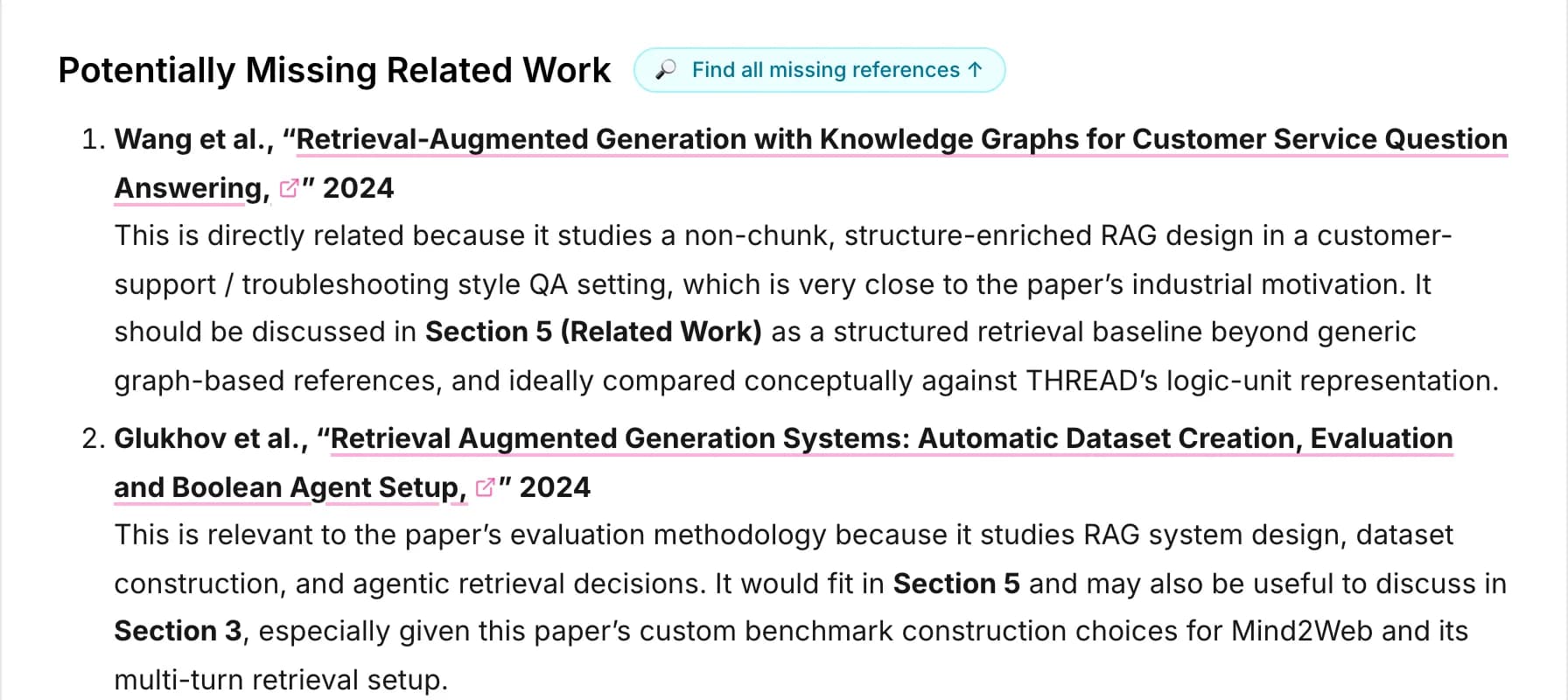
Open the review of your paper and choose the Reference Finder tab. If the review has a Potentially Missing Related Work section, the Find all missing references button next to its heading takes you there too. All your runs are also listed on the Reference Finder page.
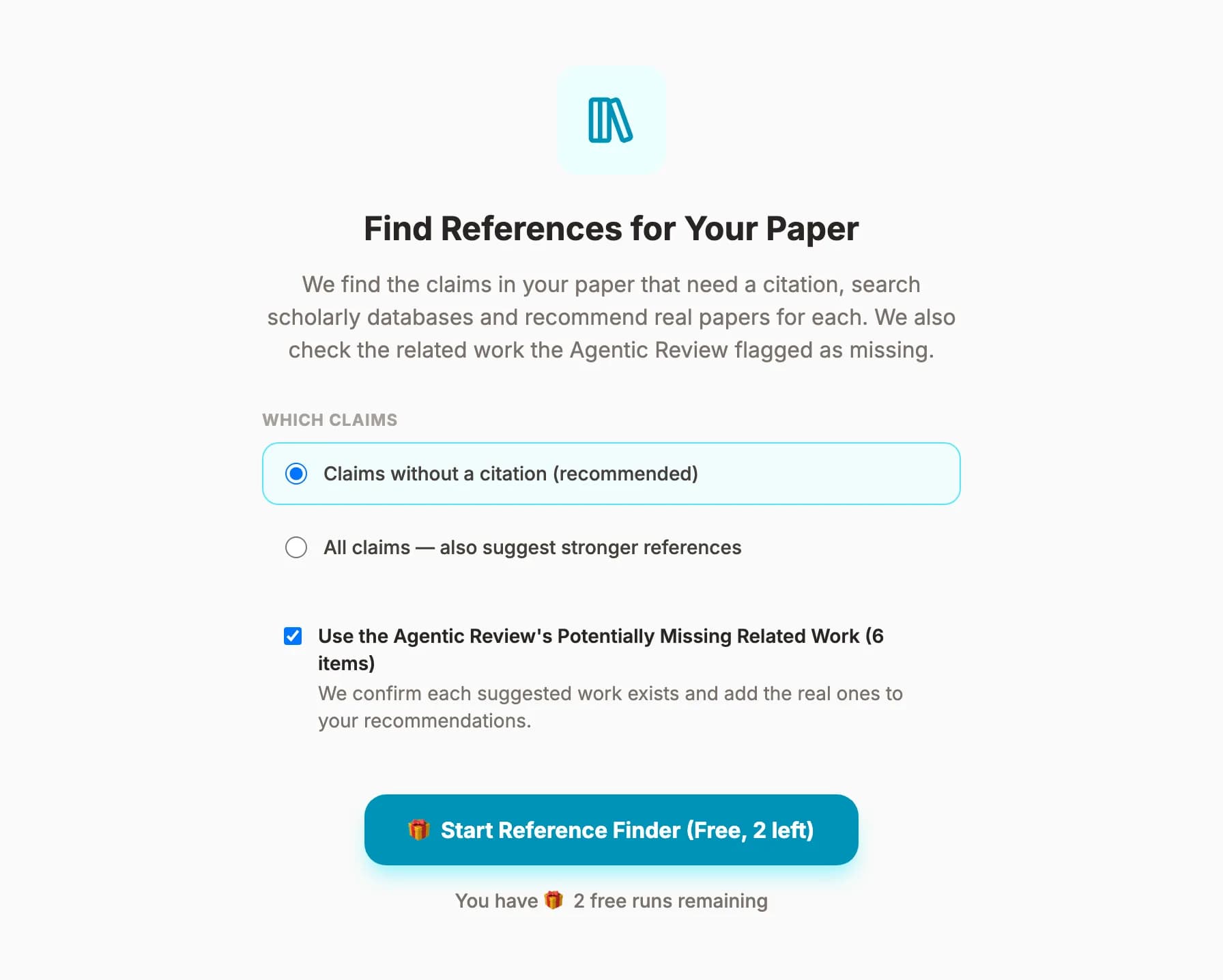
2. Choose what to check, then start
- Claims without a citation (recommended): find support for the sentences that have none.
- All claims: also suggest stronger references for claims you already cite.
- Use the Agentic Review's suggestions: check each work the review listed as missing, and add the ones that really support a claim to your results. This is on by default when the review has such a list.
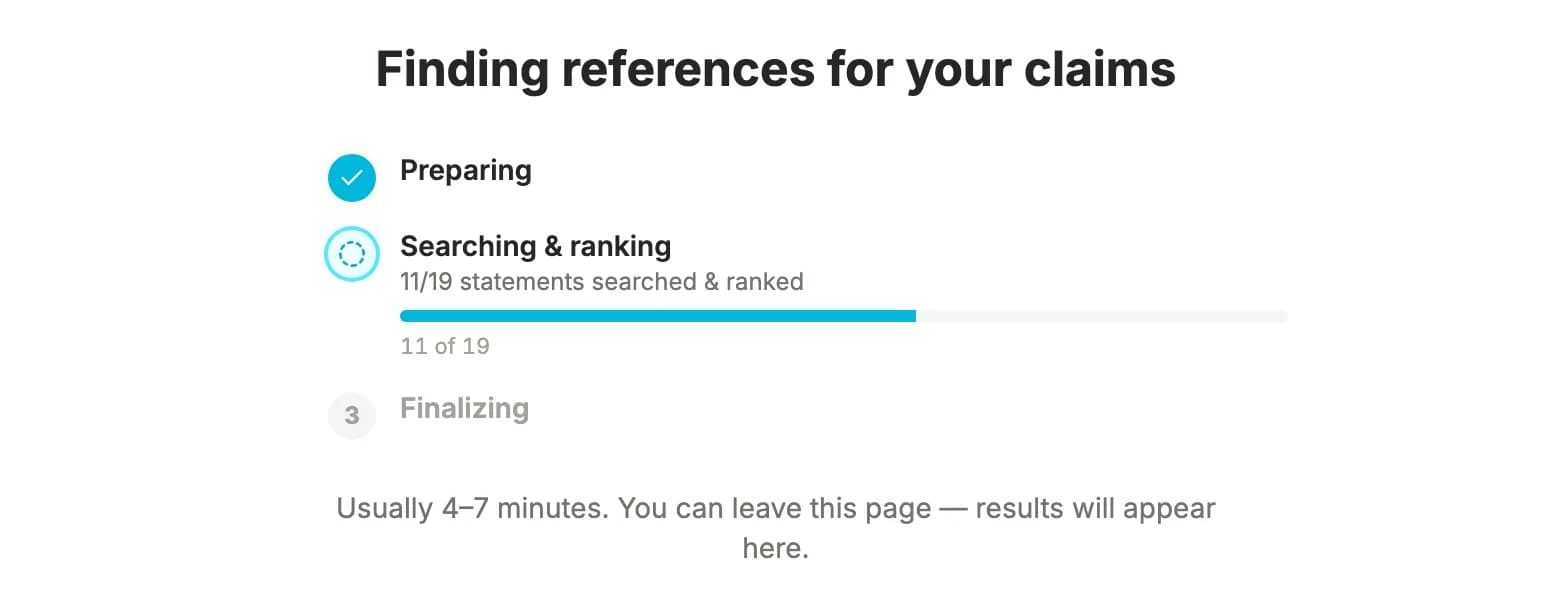
3. Let it run
A run usually takes four to seven minutes, which is about how long it takes to make a coffee and not refresh the page. It runs in the background, so you can close the tab and come back later. If a run fails, you get your credit back automatically.
How to read the results
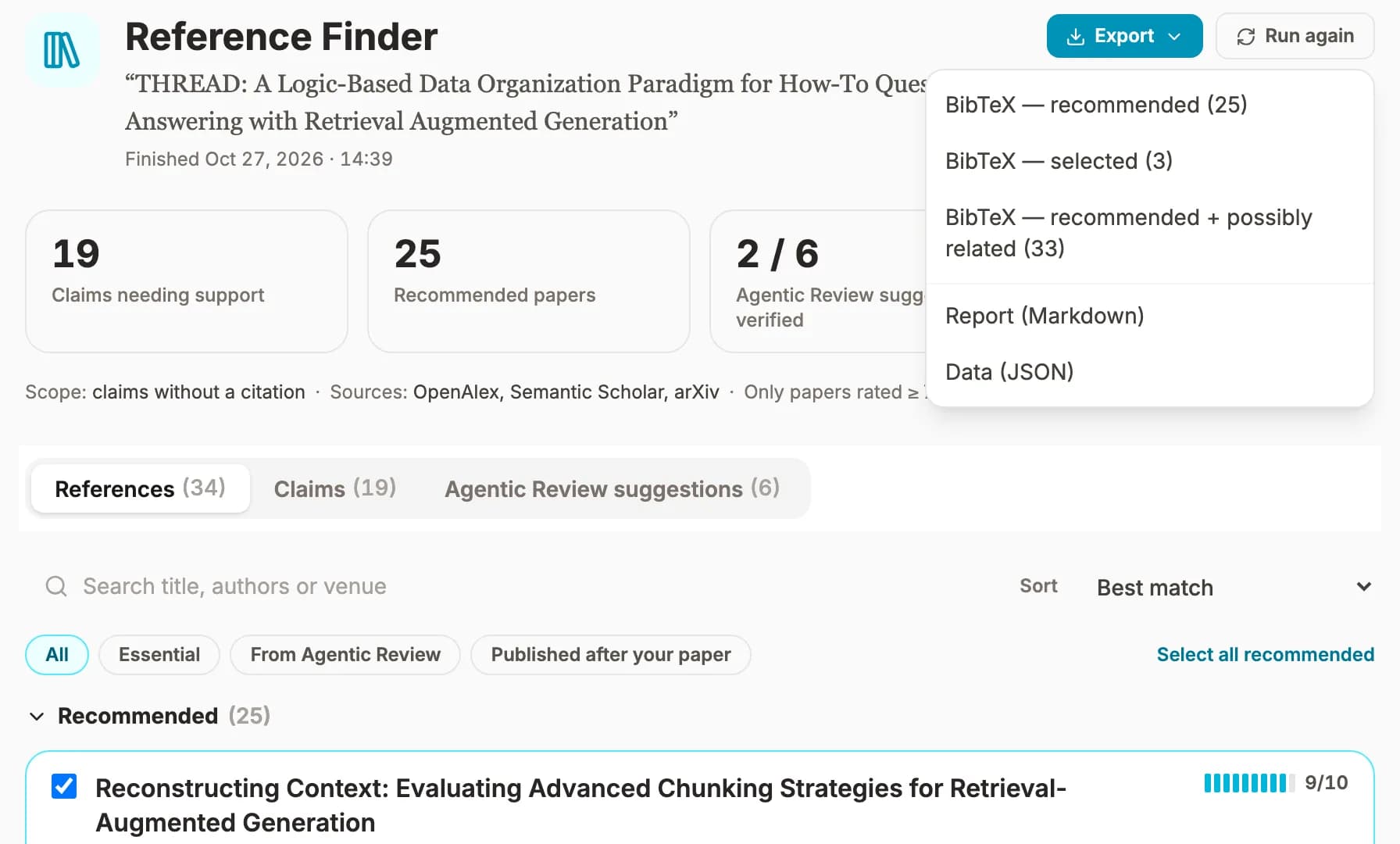
The screenshots below come from a real run on THREAD, an EMNLP 2025 paper on organizing documents for retrieval-augmented question answering, co-authored by a member of our team. The top of the page sums up the run in four numbers: how many claims need support, how many papers are recommended, how many of the review's suggestions were verified, and how many recommendations you already cite.
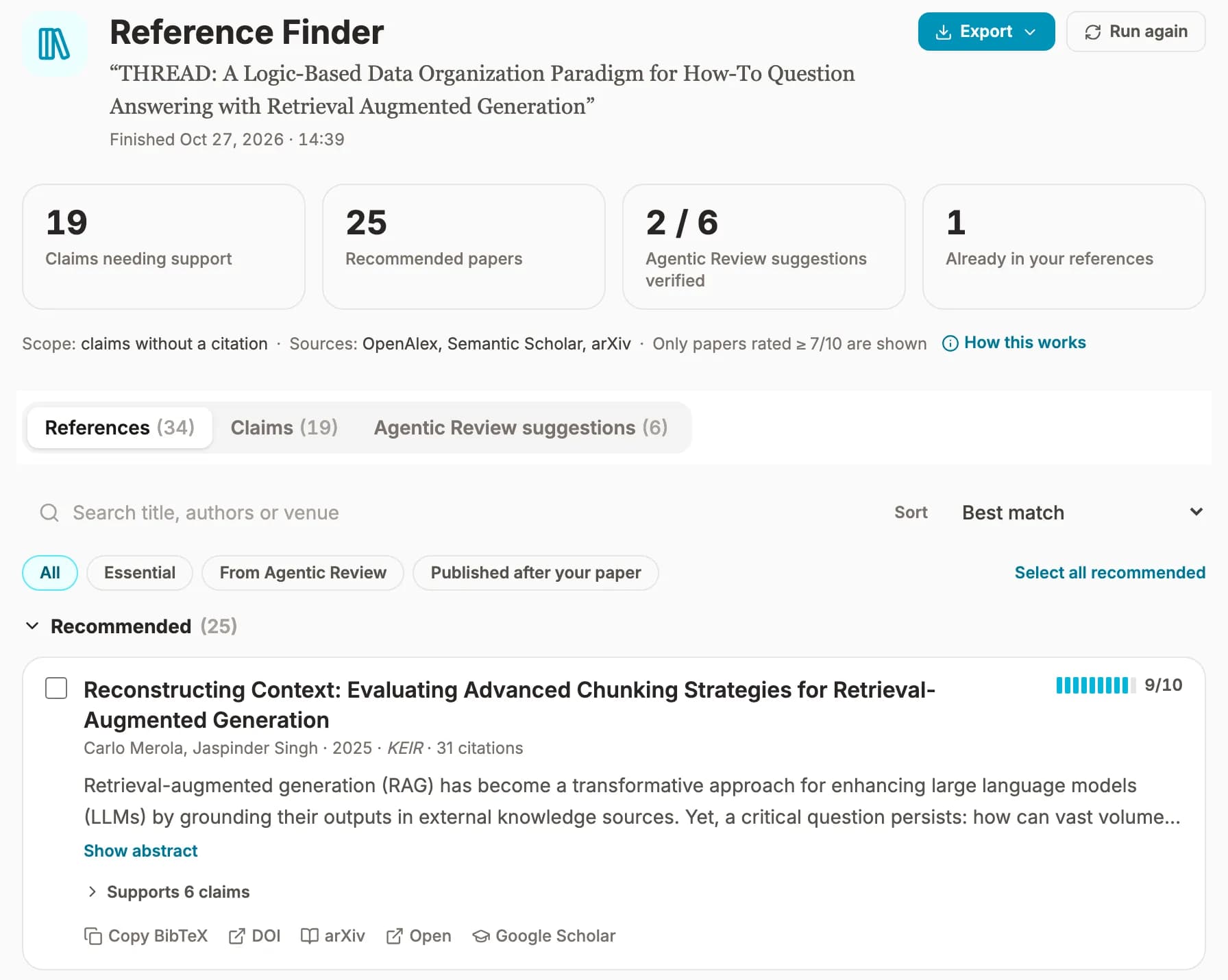
The results come in three views. References (Figure 4) lists every paper once, in three groups:
- Recommended: rated 8/10 or higher for at least one of your claims.
- Possibly related: rated 7/10. Related to the claim, but read it before you cite it.
- Already in your references: papers you cite elsewhere that also support these claims.
Three filters help you decide what to read first. Essential marks a paper a claim really can't do without, such as the paper that introduced a method or dataset you name. From Agentic Review shows the review's suggestions that made the cut. Published after your paper marks newer work. Nobody expects you to have cited it, but it may be worth a sentence in your next revision.
Claims (Figure 5) flips the list around. You see each claim as it appears in your paper, where it comes from, why it needs a citation, and the papers that back it up. A short note under each paper says what in it supports the claim, and How we searched shows the exact search queries.
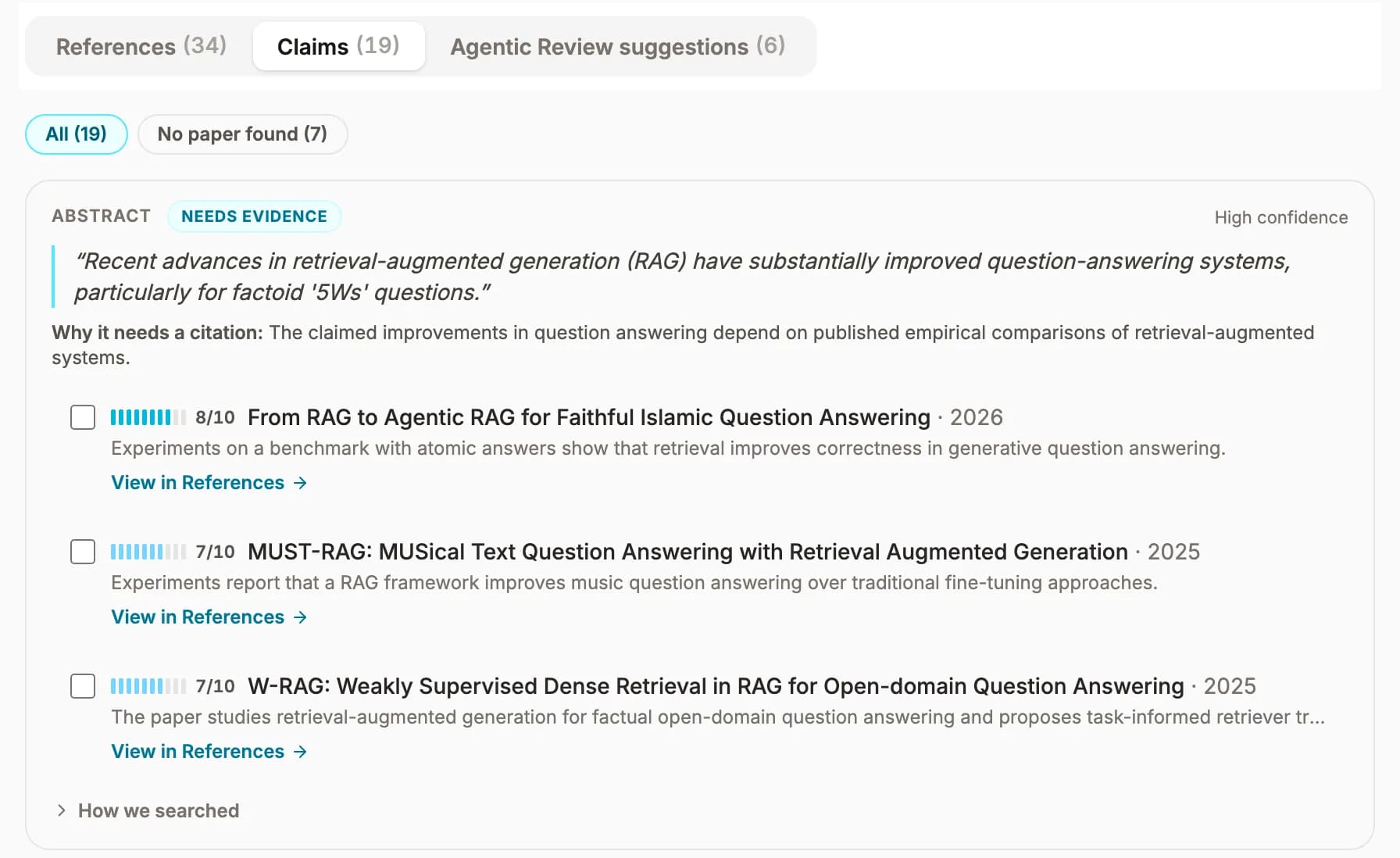
A claim with no paper found tells you something too. Maybe it rests on your own results (say so, and point to them). Maybe it's bolder than the literature allows (tone it down). Or maybe the support lives somewhere none of the nine sources covers well (time for a manual search).
The Agentic Review's suggestions, checked
Most CSPaper reviews end with a Potentially Missing Related Work section. It comes from a fast search step, built for speed rather than deep reading. The papers it finds are real, but some are related only on the surface: they share a topic or keywords with your paper without backing any of its core claims. Reference Finder takes a slower, closer look. It finds each work in the databases, then scores it against your actual claims, just like the papers it finds itself, and gives it a status:
- Recommended The work exists and scored 7/10 or higher for one of your claims, so it's added to your results.
- Verified The work exists, but it doesn't strongly support any of your claims. Fine for a related-work paragraph, not as support for a key sentence.
- Already cited Your paper already cites it.
- Couldn't verify No record matched its title, year and authors. Look it up yourself before you cite it.
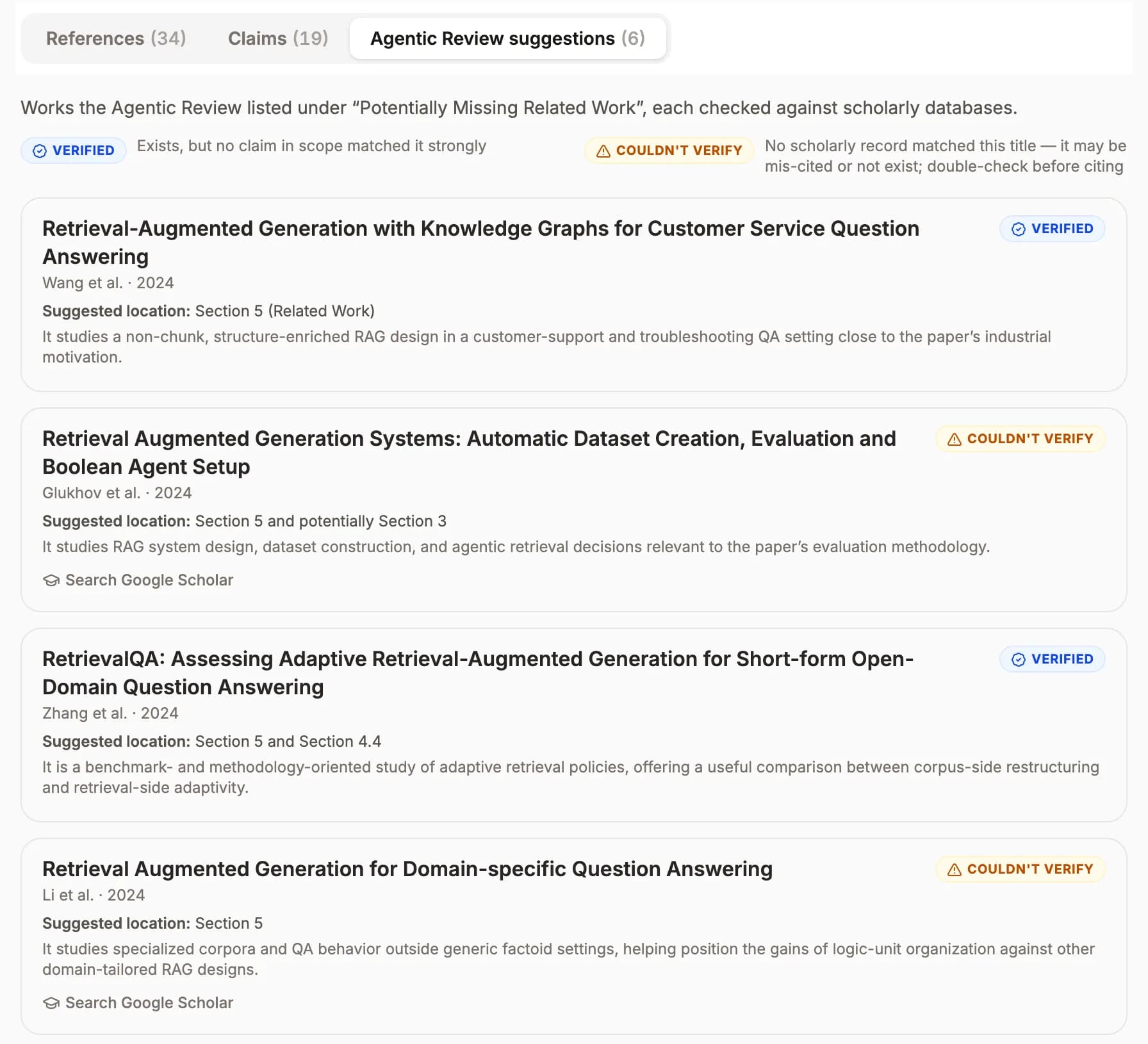
This run shows the difference. Reference Finder confirmed two of the review's six suggestions, but neither strongly backed a specific claim in the paper, so both are marked Verified. Good background reading, but not what a reviewer will ask you to cite. For the other four, the author names listed in the review didn't match the record, so Reference Finder flagged them for a quick manual check instead of guessing.
Export and keep track
Tick the papers you want to keep, or Select all recommended, then export them as BibTeX for your .bib file. You can also download a Markdown report with every claim and its papers, or the full JSON data if you like to dig.
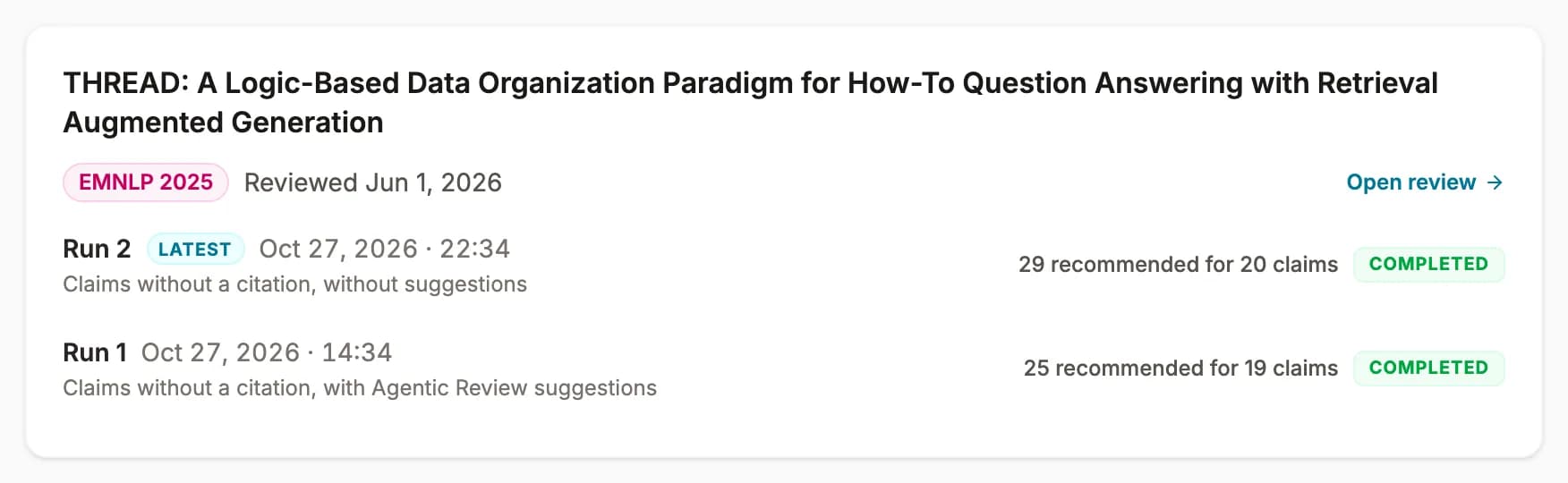
Revised the paper? Run it again. Every run is kept, and the Reference Finder page groups them by paper and by review, so you can compare runs or go back to an older one.
Read before you cite
A score is a judgment about an abstract. It doesn't replace reading the paper, and reviewers can usually tell when a citation was added by someone who never opened it. Use the results as a shortlist:
- Start with papers marked Essential and with the claims you care about most.
- Open each paper and check that it really says what your sentence needs.
- Cite the paper that introduced a method or dataset, not one that just uses it.
- Don't pad your bibliography. A few well-chosen citations help a reviewer more than a long list.
Frequently asked questions
Is Reference Finder the same as Reference Check?
No. Reference Check looks at the references you already have and asks if they are real and correct. Reference Finder looks at your claims and finds the papers you should be citing but aren't. Most papers need both.
Can Reference Finder invent a reference?
No. Every paper it shows came back from one of nine scholarly sources, such as OpenAlex, Semantic Scholar, Crossref or arXiv, and has a link you can open. The AI only scores how well each paper supports a claim. It never makes up a citation.
What do I need to run it?
A completed CSPaper Agentic Review of your paper, from an arXiv link or an uploaded PDF. Reference Finder reads the same paper text the review used.
How long does a run take, and what does it cost?
Usually four to seven minutes, and it runs in the background. Your first three runs are free (per email address). After that, each run costs 1 credit. If a run fails, you get the credit back automatically.
Should I cite everything it recommends?
No. Treat it as a shortlist. Open each paper, check that it really says what your sentence needs, and only cite what you have read.
Try it on your next paper
The best time to find a missing citation is before a reviewer does. If your paper already has a CSPaper review, Reference Finder is one click away in its Reference Finder tab. If not, start a review first: it takes an arXiv link or a PDF, and Reference Finder works from the same paper.
Your first three runs are free. After that, each run costs 1 credit, and you get it back if a run fails.
Found a claim it should have caught, or a paper it should not have recommended? Tell us. It gets better fastest when researchers try it on real papers.
References
[1]Tai, M. M. (1994). A mathematical model for the determination of total area under glucose tolerance and other metabolic curves. Diabetes Care, 17(2), 152–154. doi.org/10.2337/diacare.17.2.152
[2]Monaco, J. H., & Anderson, R. L. (1994). Tai's formula is the trapezoidal rule. Diabetes Care, 17(10), 1224–1225. doi.org/10.2337/diacare.17.10.1224
[3]Fergusson, D., Glass, K. C., Hutton, B., & Shapiro, S. (2005). Randomized controlled trials of aprotinin in cardiac surgery: could clinical equipoise have stopped the bleeding? Clinical Trials, 2(3), 218–229. doi.org/10.1191/1740774505cn085oa
[4]Lau, J., Antman, E. M., Jimenez-Silva, J., Kupelnick, B., Mosteller, F., & Chalmers, T. C. (1992). Cumulative meta-analysis of therapeutic trials for myocardial infarction. New England Journal of Medicine, 327(4), 248–254. doi.org/10.1056/NEJM199207233270406
[5]Antman, E. M., Lau, J., Kupelnick, B., Mosteller, F., & Chalmers, T. C. (1992). A comparison of results of meta-analyses of randomized control trials and recommendations of clinical experts. JAMA, 268(2), 240–248. doi.org/10.1001/jama.1992.03490020088036
[6]Robinson, K. A., & Goodman, S. N. (2011). A systematic examination of the citation of prior research in reports of randomized, controlled trials. Annals of Internal Medicine, 154(1), 50–55. doi.org/10.7326/0003-4819-154-1-201101040-00007
[7]Rumelhart, D. E., Hinton, G. E., & Williams, R. J. (1986). Learning representations by back-propagating errors. Nature, 323(6088), 533–536. doi.org/10.1038/323533a0
[8]Linnainmaa, S. (1976). Taylor expansion of the accumulated rounding error. BIT Numerical Mathematics, 16(2), 146–160. doi.org/10.1007/BF01931367
[9]Synced (2020, April 23). Who invented backpropagation? Hinton says he didn't, but his work made it popular. syncedreview.com/2020/04/23/who-invented-backpropagation-hinton-says-he-didnt-but-his-work-made-it-popular/
[10]Goodfellow, I., Pouget-Abadie, J., Mirza, M., Xu, B., Warde-Farley, D., Ozair, S., Courville, A., & Bengio, Y. (2014). Generative adversarial nets. Advances in Neural Information Processing Systems 27, 2672–2680. proceedings.neurips.cc/paper_files/paper/2014/file/f033ed80deb0234979a61f95710dbe25-Paper.pdf
[11]Schmidhuber, J. (2020). Generative adversarial networks are special cases of artificial curiosity (1990) and also closely related to predictability minimization (1991). Neural Networks, 127, 58–66. arxiv.org/abs/1906.04493
[12]NeurIPS 2025 Reviewer Guidelines. neurips.cc/Conferences/2025/ReviewerGuidelines
[13]ACL Rolling Review. Reviewer Guidelines. aclrollingreview.org/reviewerguidelines
[14]Kargaran, A. H., Nikeghbal, N., Yang, J., & Ousidhoum, N. (2025). Insights from the ICLR peer review and rebuttal process. arXiv:2511.15462. arxiv.org/abs/2511.15462
[15]GPTZero (2026, January 21). Hallucinated citations in NeurIPS 2025 accepted papers. gptzero.me/news/neurips/
[16]ICLR (2026, March 31). A retrospective on the ICLR 2026 review process. blog.iclr.cc/2026/03/31/a-retrospective-on-the-iclr-2026-review-process/